News post guidelines
Content
- Introduction of new teachers & informing students of teachers who have left;
- TEF employee of the month award & charity; and
- Anything new and relevant to TEF and our students.
Objectives
- introduce new information that will benefit students (new site features or services, bugs, campaigns, or even advice)
- put a spotlight on new & existing teachers so students can get to know them and what kind of lessons they may teach
- promote TEF's positive culture (and create or keep loyal students)
- guide students to take good actions to reach their goals
General guidelines
- The shorter the better. We don't want to overload people.
- Do have enough detail to make your point clear. It's a balance.
- Title of the actual news post: aim for 10 words or less. Just put a brief list of the content (e.g. New teacher, improving your listening, and education equality). Make sure readers can know what to expect & be engaged by the title. You can use an app like Wordcounter for the word count.
- Start with a quick intro (save students time by cutting out waffling) and go to the subtitles.
- Subtitles: aim for 10 words or less. The shorter the better. Our shortest so far has been 2 words (Sayonara, Skype!). Use "Heading 3" from the Format tab.
- Order:
1. Start with the most important thing (maybe "new teacher intros" for most monthly posts); and
2. End with the TEF staff award since that'll be monthly and people can expect that. Plus it's a high note to end on. - Put links to TEF content in when necessary & possible to remove obstacles for our students. This will also help our SEO.
- Will they understand the language? There are some words we use internally (e.g. TEF fertilizer award) that we don't use externally (e.g. the Employee of the Month award).
- You may have to explain some things that might seem obvious to you.
For example:
- students may not be aware that we have monthly workshops (easily solved by writing something like "in our monthly internal workshops" without putting too much attention to them); and
- some don't realize we have a homework service or audio recordings (you can link to them if there are help pages or preface an explanation with something like "as many of you know"). - You also don't want to be explaining things that are actually obvious to students, so having someone edit your writing will help you see any blind spots.
- The biggest difference between blogs and news posts is that news posts get fully localized. You don't have to write vocabulary at the end, but please do keep it fairly easy to read for a non-native speaker.
Example
This is an example using TEF July 2019 news posts.
Guidelines for introducing new teachers
- Keep the word count under 60 words. Do add "You can read more about [name] on [his/her/their profile]" at the end of it as well as "Reserve a lesson with [name]" underneath (the last two don't count as part of the 60-word limit).

- Please put a link to their profile for the "read more about [name]" part and a link to their schedule for the "Reserve a lesson with [name]" part. Make sure the link is to their schedule, not yours!
- You can take all the information out of their profile (usually www.theenglishfarm.com/users/name ← instead of "name", you should put in the person's actual name. E.g. www.theenglishfarm.com/users/kara would pull up Kara's profile. Every so often there will be rare ones like www.theenglishfarm.com/users/matt-v for Matt V's profile).
- If you'd like, you can contact the new teacher and talk to them a bit or ask them questions via chat to see if they'd like us to add anything to the introduction.
- Please send the introduction to the new teacher to make sure there's no misleading or incorrect information on the post.
- One thing to remember is that some students may automatically assume or at least wonder if a teacher of a certain race or nationality is not a native speaker or equipped to teach English. Please make sure you make it abundantly clear (but not in-your-face about it) that the new teacher is definitely able to teach them well. See Eric's intro ("originally from Vancouver") and Hina's intro ("English being her dominant language") for examples.
- Farewells should be kept under 50 words, too. It's best to keep things vague unless otherwise asked.
- Remember that these are guidelines and not set in stone. If you absolutely have to write a 70-word intro and you see no way around it, go for it!
Guidelines for TEF employee of the month award
-
Kara will send you the TEF fert award info (the winner & reasons) on the 8th of every month (please keep in mind time zones). Please do not congratulate the recipient at that point because we want to keep it a surprise!
She will also send out the forum post by the 12th of every month, so once the internal forum post goes out, feel free to congratulate the recipient if you'd like.
- The title has the employee's name and a glimpse of who they are donating to.
- Start with something like, "Our Employee of the Month award for [month] goes to...," and please link to our CSR page the way it is linked in this sentence.
- Word limit: 100 words max for the top part that you write (about why the person deserves the award) & 40 words for the teacher's comment (about why they chose the charity).
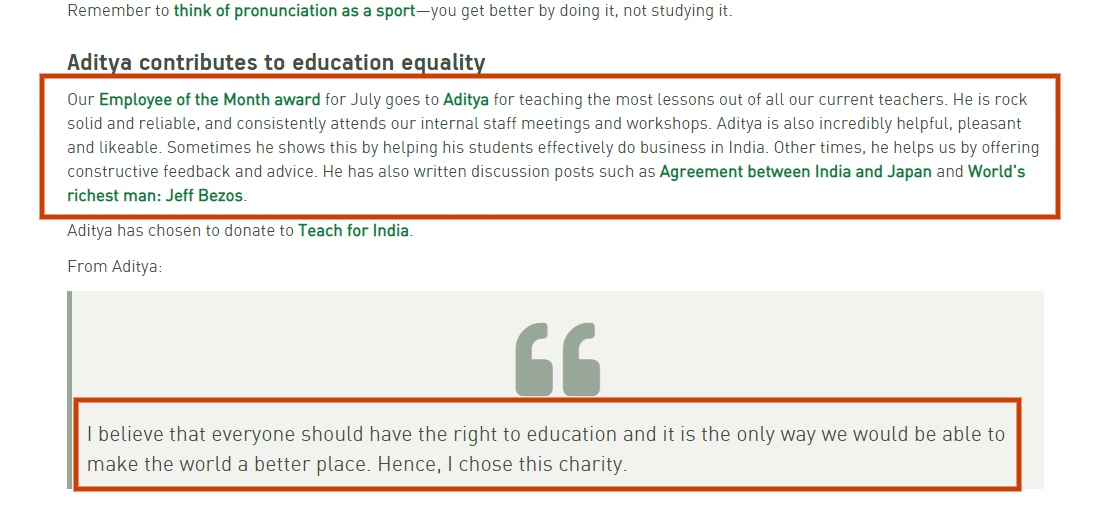
- You will have to reword some things so that a student who is new to the TEF system can understand what we are talking about (e.g. "water cooler chat room" → "group chat room").
- You will have to explain some things in more detail (e.g. "In our monthly staff meetings, teacher workshops and group chat rooms..."; explain where students can find the homework button in their emails/on My Page). The TEF award news post is not just a tool to acknowledge the work people put into TEF, but it is also a tool to show students, potential students, and company HR people what kind of things we do for/with our teachers. It's a way for us to show people what sets us apart from other online English schools that don't give teachers certain benefits or training (e.g. workshops, meetups, how we're a flat organization, etc.).
- You will have to omit some things that aren't relevant to students (e.g. "This teacher always Likes are posts on Facebook").
- If someone has written content (lessons, blogs, discussion posts, social media posts) for TEF, please find some examples of the really good ones and link to those. This is so teachers get proper acknowledgement, students can read old blog posts, and to improve SEO, usability and increase page views. Remember to use words/phrases that people will search for when you link things (e.g. "transition phrases" is waaaaay better than "click here").
Please ask Jeremy or Kara if you have trouble finding blog/discussion/lesson content (some teachers choose not to write).
- If you do link to old blogs, make sure you change the vocab section so it uses the new language format (we used to put things in bold before).
- Please link to the charity as well (the image for the news post usually comes from the charity's website or a Google image search of the website. If you are having size issues, Aki H might be able to help you).
Past TEF award news posts vs forum posts
*Note: the old TEF award news posts were much longer.
Images
Images should be simple and relevant. They shouldn't be cluttered. Make sure that images are as small as possible without sacrificing quality. If you need to adjust the size or make an image clearer but don't know how, Aki H may be able to help you.
Sources you can use: Freepik, Flickr, etc. Please make sure the licensing is OK.
Images should be:
- about 1000px in their maximum dimension;
- JPEG or JPG format;
- medium quality; and
- File size of less than 300Kb.
Localization
- Finish writing the English post;
- Get Matt to edit it (especially if it has info on new TEF stuff you may not be familiar with yourself);
- Create a new card for your post on the "News posts" list on the Trello Communications board;
- Add Matt, Aki H, Hina, and Mai to the card;
- Send Mai a message on the card asking her to localize it & put a deadline on it (Mai is the main person in charge of localizing news posts, and Aki H will copy edit them). If Matt has already edited it, write that in the message too so Hina doesn't double-check it.
Localization process
Di (writes news post) --> Matt (or someone else edits the content & English) --> Mai (localizes) --> Hina (edits) --> Aki H (publishes/she also oversees everything so everything runs smoothly)