Paypal payment received, but no points given ("Checkout: confirm order" error)
When a student purchases points via Paypal, after completing the purchase, they must wait to be automatically redirected back to the TEF site. This is so Paypal can tell TEF that payment was received. If they do not wait, and navigate away from that page, then TEF will not credit lesson points to the student.
You can tell this has happened, because we receive notification from Paypal of funds received, but there is no confirmation from the site (no receipt issued and no notification of points added to the account). Students will complain that they completed payment, but did not get the points.
On this page https://theenglishfarm.com/admin/commerce/orders/carts you will see the error "Checkout: Confirm order" shown below:
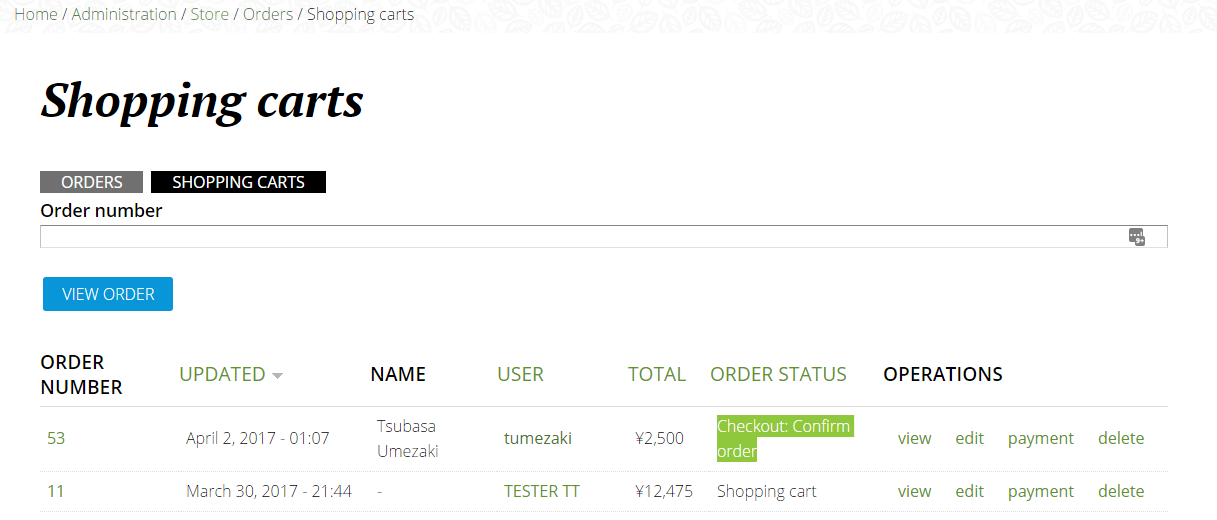
The correct way to deal with this error is as follows:
- If you look at this URL, while logged in as an admin https://theenglishfarm.com/admin/commerce/orders/carts
- You will see the abandoned/unprocessed carts. If you look for the cart of the uncompleted order, you can hit the “edit” link next to it.
- On the edit page, there is a link at the top of the page marked “simulate checkout completion”. If you click on that, TEF will act as if order confirmation was received and consequently all rules and behaviours associated with that confirmation event, including allocating the appropriate points, changing the order status and history etc., will be triggered.
This will typically be the quickest and neatest way to complete orders of this kind as it not only allocates points but triggers any other rules and keeps your store’s paper trail complete and sends out the correct notifications to staff and students.